Search This Blog

Thursday, March 14, 2013

Mass conversion of .wma files to .mp3 files on Mac OSX command line...with Ruby and ffmpeg.

I recently discovered that iTunes hadn't imported my CD library when I brought in my music collection because it doesn't like .wma files.  Typical of Apple, they don't like that file format....sigh.

Here's a 2-liner Ruby script I used to convert everything from wma to mp3 format:

#!/usr/bin/env ruby

ext = ".wma"
Dir.glob("**/*#{ext}").each {|f| m = f.gsub(ext, '.mp3'); `ffmpeg -i '#{f}' -ab 192k -ac 2 -ar 44100 '#{m}'` }

I got this from https://ariejan.net/2010/09/11/mass-convert-wma-to-mp3-using-ffmpeg-and-ruby but found out that it only worked on .wma files in the directory from which you ran the script.  Google and StackOverflow saved the day and helped me to convert the Dir.glob to match all subdirectory levels.

I used:

Dir.glob("**/*#{ext}")

instead of

Dir.glob("*#{ext}")

I've never used Ruby before and probably could've done the same thing in Python but this is the first command line example that came up in google so I dove in and gave it a try...

Thursday, November 29, 2012

Splitting Kongsberg water column data into .all and .wcd files.

I goofed up on my previous post about this, I'm learning blog formatting as I go and apparently my code got a little funky when I cut and paste it into the blog.  Here's another attempt that should be safer (I think).

Have fun!!

 #!/usr/bin/env python2.6  
   
 import os  
 import struct  
 import time  
 import sys  
   
 file_count=0  
 debug=False  
   
 dir="split"  
   
 for filename in sys.argv:  
   
   file_count += 1  
   
   if (file_count == 1):  
     # I'm too lazy to parse command line args so just skipping over the   
     # script name (which is arg zero in the list)  
     continue  
   
   file = open(filename, 'rb')  
   filesize = os.path.getsize(filename)  
   
   # What is the path to the input file without the filename?  
   filepath=os.path.dirname(filename)  
   fileprefix=os.path.basename(filename)  
   if debug or True:  
     print "Doing file",filename  
     print "Got file path",filepath  
     print "Got file basename",fileprefix  
   
   # Join the file's directory path with the usual output subdirectory name  
   outdir=os.path.join(filepath,dir)  
   
   if not os.path.exists(outdir):  
     os.makedirs(outdir)  
   
   split_allname = os.path.join(outdir, fileprefix)  
   split_wcdname = split_allname.replace(".all",".wcd")  
   
   if debug or True:  
     print filename, "will split into", split_allname, split_wcdname  
   
   if not os.path.exists(split_allname):  
     split_allfile = open(split_allname,"wb")  
     split_wcdfile = open(split_wcdname,"wb")  
   else:  
     print "Skipping", filename, "since it's already split!"  
     file.close()  
     continue  
   
   last_percent = 0  
   while True:  
   
     # Make sure we don't try to read beyond the EOF  
     if (file.tell() + 6 > filesize):  
       break  
   
     line = file.read(6)  
   
     header = struct.unpack("<IBB",line)  
   
     rawlength=line[0:3]  
     length = header[0]  
     stx = header[1]  
     id = header[2]  
   
     if (stx != 2):  
       if debug:  
         print 'STX not found, trying next datagram at position',file.tell()-5  
       file.seek(-5,1)  
       continue  
   
     if debug:  
       print 'STX found, going to try for ETX now'  
   
     # Make sure we don't try to read beyond the EOF  
     if (file.tell() + (length-5) > filesize):  
       file.seek(-5,1)  
       continue  
   
     file.seek(length-5,1)  
   
     # Make sure we don't try to read beyond the EOF  
     if (file.tell() + 3 > filesize):  
       break  
   
     line = file.read(3)  
     footer = struct.unpack("<BH",line)  
     etx = footer[0]  
     checksum = footer[1]  
   
     if (etx != 3):  
       if debug:  
         print 'ETX not found, trying next datagram at position',file.tell()-(length+3)  
       file.seek(-(length+3),1)  
       continue  
   
     # Rewind to very beginning of the datagram, including the length field  
     file.seek(-(length+4),1)  
     data = file.read(length+4)  
   
     if debug:  
       print "Got id", id, "and length", length  
   
     if (id == 0x49 or id == 0x69 or id == 0x52 or id == 0x55):  
       # Stuff for both files  
       split_allfile.write(data)  
       split_wcdfile.write(data)  
     elif (id == 0x6B):  
       # Just for the watercolumn file  
       split_wcdfile.write(data)  
     else:  
       # Everything else goes into the raw file  
       split_allfile.write(data)  
   
     percent=int(100.0 * file.tell()/filesize)  
   
     if (percent%5 == 0 and percent != last_percent):  
       print percent, "% done, ALL:",split_allfile.tell()," WCD:",split_wcdfile.tell()  
       last_percent = percent  
   
     if file.tell() >= filesize:  
       break  
   
   file.close()  
   split_allfile.close()  
   split_wcdfile.close()  
   
 print 'All done!'  


Six degrees of Kevin Bacon...in my music collection

I used to play a game with making music playlists SEVERAL years ago when I used to have time to do such things...anyway...the game involved picking a word and then finding a song in my collection with that word.  Then you'd pick another word from the song you just found and then you'd have to find another song with that word.  You'd carry on doing this until you got bored and then you'd hit play and go drink beer.  Here's an example:


Word 1: sun
Song 1: "House of the Rising Sun", by the Animals.
Word 2: house
Song 2: "Burning Down the House", by the Talking Heads.
Word 3: burning
Song 3: "Burning Love", by Elvis Presley
Word 4: love
Song 4: "Love Hurts", by Nazareth

...and so on...

It was kind of interesting since sometimes you'd pick a bad song and end up down a blind alley.

So, I started doing that the other day but I thought of a variant: you choose TWO words and then you use the method above to find one song and then you need to follow the same method until you come to a song with the second chosen word in it.  Sort of like "Six Degrees of Kevin Bacon" but with your music collection.  You can make an example from the scenario explored above:

Connect the words "sun" and "hurts" in six songs or less.

That's easy, we just did it and here's the answer:

Song 1: "House of the Rising Sun", by the Animals.
Song 2: "Burning Down the House", by the Talking Heads.
Song 3: "Burning Love", by Elvis Presley
Song 4: "Love Hurts", by Nazareth

Give another a try on your own.  Connect the words "sun" and "money" in six songs or less.  Go ahead, try it!  I'll wait.

If you're insane, you can try to find the minimum number of songs required to do this.  This, naturally, got me to thinking how I would go about scripting my way out of this problem and it reminded me of some computer science courses I took many years ago where the ideas of connected graphs were explored, including algorithms to traverse them.  I can't remember much of the traversal theory, my naive guess is that in order to jump from a randomly chosen word to another it would be best to try and connect to "hub" words that appear in a lot of songs.  This would involve figuring out which words appear the most and then we'd need to compute the graph topology to represent how words are connected.

I think the most sensible way to start breaking down the problem would be to:

1) build a list of ALL words in my song collection
2) figure out the count for each word, i.e. how many songs does the word "Love" appear in?  (913 songs in my collection).

So, here's my first attempt at figuring out the preliminary steps above.

find . -type f -name \*.mp3 -o -name \*.MP3 -o -name \*.m4a -o -name \*.m4v -o -name \*.wma | awk -F/ '{print $NF}'| awk -F. '{print $(NF-1)}' | sed -e 's/_/ /g' -e 's/(/ /g' -e 's/)/ /g' -e 's/,/ /g' -e s/"'"s//     | sed -e 's/ /\
/g'| perl -nle 'print if m{^[[:ascii:]]+$}' | aspell clean | awk '{ if (length($1)>2) print $1;   }' | tr '[:upper:]' '[:lower:]' | tee all_words.txt | sort -u > unique_words.txt  

Yeah, I know it's a big nasty one liner.  Here's the same thing broken down:

Step 1: use the find command to "find" regular files (-type f) whose file extensions match a set of music file types:


find . -type f -name \*.mp3 -o -name \*.MP3 -o -name \*.m4a -o -name \*.m4v -o -name \*.wma 


Step 2: Pipe output of 1 to awk, use the "/" separator to split each file that's found into directories and filenames and print the last one (the filename without the directory structure).  Do a similar trick to split the filename into name and extension using the period as the field separator, this time print the second last entry to get the filename without leading directory structure and without the file extension.


awk -F/ '{print $NF}'| awk -F. '{print $(NF-1)}'

Step 3: use the sed command to strip out weird characters that will just get in our way, like parentheses and underscores, etc, etc.

sed -e 's/_/ /g' -e 's/(/ /g' -e 's/)/ /g' -e 's/,/ /g' -e s/"'"s//

Step 4: use the sed command again to turn all spaces into carriage returns so that we can split up a song name into just the words and have each word be on a line by itself.  This one was tricky since you need to embed a carriage return in the replacement portion of sed.

sed -e 's/ /\
/g'

Step 5: use perl to strip out non-ascii characters, like those french songs you downloaded after watching Amelie, you know, the ones with funny accents in the file names:

perl -nle 'print if m{^[[:ascii:]]+$}' 


Step 6: Run the whole stream through a spell checker and remove words that don't appear in the dictionary:


aspell clean


Step 7: Use awk to figure out which words are very short and exclude them, like 'a', 'as', 'is', 'to':


awk '{ if (length($1)>2) print $1;   }' 


Step 8: Non convert all uppercase characters to lower case using the 'tr' command.


tr '[:upper:]' '[:lower:]'


Step 9:  Dump all the words into a file using the 'tee' command and then sort the same stream into a second file which contains only unique instances of the words, i.e. you won't see the word "love" in this file 913 times, it will only appear once).


tee all_words.txt | sort -u > unique_words.txt


It turns out that my music collection has 6,743 unique words in it.  In alphabetical order, the first one word is "aaa" from Big Sugar's "AAA Aardvark Hotel" and the last word is "zorba" from the Gypsy King's "Zorba the Greek".


Okay, now how do we figure out how many instances there are of each word?  We spin up a loop that visits each unique word and then uses 'grep' to find ENTIRE word matches (-w) in the file containing all the words in the song collection.  This gets dumped into a file which holds the count for each word.


rm word_counts.txt
for word in `cat unique_words.txt`;
do
    count=`grep -w $word all_words.txt | wc -l`
    echo $count $word >> word_counts.txt
done


You can use the sort command to determine which words show up the most:

sort -rn word_counts.txt

Here's the top ten words in my music collection, along with their counts:


2993 the
1214 you
913 love
569 and
328 your
304 don
288 don't
286 for
216 man
214 with


Okay, that's a good spot to stop for tonight.  Maybe I'll pick this up again someday, maybe I won't.  It was fun crafting the mega one-liner to come up with this though.


Friday, July 6, 2012

Cruise specific sea surface temperature/salinity animations

I'm currently sitting offshore south of Iceland about to pass over the Mid-Atlantic Ridge.  We're shooting EM302 multibeam and, as always, I'm curious about what to expect from the ocean's temperature and salinity.

The RTOFS grids that I've been playing with for the past while have come in handy again.  I wrote a script to pull down the imagery that's generated on a daily basis on the RTOFS website and a bit of sorcery with ImageMagick's "convert" program massages it into a little animation for me to see the sea surface temperature and salinity every day.

Here's an example:


And here's the script:


#!/bin/bash


dir=`date '+%Y%m%d'`


rm -rf $dir
mkdir $dir
cd $dir


for field in temperature salinity; do


        echo "Doing field" $field


        for hour in 024 048; do
                echo "Doing nowcast" $hour
                wget http://polar.ncep.noaa.gov/global/nctest/images/large/rtofs_arctic_$field\_n$hour\_0.png
        done


        for hour in 024 048 072 096 120 144; do
                echo "Doing forecast" $hour
                wget http://polar.ncep.noaa.gov/global/nctest/images/large/rtofs_arctic_$field\_f$hour\_0.png
        done
done


for file in *.png; do


        prefix=`basename $file .png`
        convert -crop 1840x120+0+1131 $file scale.ppm


        # I have to convert to .ppm to toss out rotation info in png header such that 
        # the crop operation works?  Otherwise, the crop geometry is in the original unrotated
        # image geometry.
        convert -rotate 135 $file temp.ppm
        convert -crop 450x360+600+1000 temp.ppm temp2.ppm


        label=`echo $file | awk -F_ '{print '$dir',$3,$4}' `


        convert -draw "image Over 0,310 450,52 scale.ppm" -fill white -stroke black -pointsize 24 -draw "text 10,30 '$label'" temp2.ppm $file


done

for temperature_file in *temperature*png; do
        output_file=`echo $temperature_file | sed -e 's/temperature/TS/' `
        salinity_file=`echo $temperature_file | sed -e 's/temperature/salinity/' `

        convert -extent 900x360 -draw "image Over 450,0 450,360 $salinity_file" $temperature_file $output_file
done

convert -loop 0 -delay 50 rtofs_arctic_temperature_f*png temperature_animation.gif
convert -loop 0 -delay 50 rtofs_arctic_salinity_f*png salinity_animation.gif
convert -loop 0 -delay 50 rtofs_arctic_TS_f*png TS_animation.gif

rm temp.ppm temp2.ppm scale.ppm


Thursday, July 5, 2012

Splitting up Kongsberg Watercolumn files

Sometimes you just forget to save Kongsberg multibeam water column data into a separate file.  This just happened to me on a cruise and I found that the >2GB file sizes made my 32-bit software puke.  Luckily, the file sizes didn't exceed 4GB so I decided to write a file splitter in python the pulls apart the original .all file and outputs a new .all file purged of water column datagrams AND a separate .wcd file.  Here's my first cut at it, it's a script that you feed a list of filenames and it creates a "split" subdirectory for each file and writes a split .all/.wcd combination into the split subdirectory, for example, the file:

    20120702/0003_20120702_122222_FK_EM710.all

will split into:

    20120702/split/0003_20120702_122222_FK_EM710.all    
    20120702/split/0003_20120702_122222_FK_EM710.wcd

Give it a try, I hope it doesn't nuke your data.


#!/usr/bin/env python2.6


import os
import struct
import time
import sys 


file_count=0
debug=False


dir="split"


for filename in sys.argv:


    file_count += 1


    if (file_count == 1): 
        # I'm too lazy to parse command line args so just skipping over the 
        # script name (which is arg zero in the list)
        continue


    file = open(filename, 'rb')
    filesize = os.path.getsize(filename)


    # What is the path to the input file without the filename?
    filepath=os.path.dirname(filename)
    fileprefix=os.path.basename(filename)
    if debug or True:
        print "Doing file",filename
        print "Got file path",filepath
        print "Got file basename",fileprefix


    # Join the file's directory path with the usual output subdirectory name
    outdir=os.path.join(filepath,dir)


    if not os.path.exists(outdir):
        os.makedirs(outdir)


    split_allname = os.path.join(outdir, fileprefix)
    split_wcdname = split_allname.replace(".all",".wcd")


    if debug or True:
        print filename, "will split into", split_allname, split_wcdname


    if not os.path.exists(split_allname):
        split_allfile = open(split_allname,"wb")
        split_wcdfile = open(split_wcdname,"wb")
    else:
        print "Skipping", filename, "since it's already split!"
        file.close()
        continue


    last_percent = 0
    while True:


        # Make sure we don't try to read beyond the EOF
        if (file.tell() + 6 > filesize):
            break


        line = file.read(6)


        header = struct.unpack("


        rawlength=line[0:3]
        length = header[0]
        stx = header[1]
        id = header[2]


        if (stx != 2):
            if debug:
                print 'STX not found, trying next datagram at position',file.tell()-5
            file.seek(-5,1)
            continue


        if debug:
            print 'STX found, going to try for ETX now'


        # Make sure we don't try to read beyond the EOF
        if (file.tell() + (length-5) > filesize):
            file.seek(-5,1)
            continue


        file.seek(length-5,1)


        # Make sure we don't try to read beyond the EOF
        if (file.tell() + 3 > filesize):
            break


        line = file.read(3)
        footer = struct.unpack("
        etx = footer[0]
        checksum = footer[1]

        if (etx != 3):
            if debug:
                print 'ETX not found, trying next datagram at position',file.tell()-(length+3)
            file.seek(-(length+3),1)
            continue

        # Rewind to very beginning of the datagram, including the length field
        file.seek(-(length+4),1)
        data = file.read(length+4)

        if debug:
            print "Got id", id, "and length", length

        if (id == 0x49 or id == 0x69 or id == 0x52 or id == 0x55):
            # Stuff for both files
            split_allfile.write(data)
            split_wcdfile.write(data)
        elif (id == 0x6B):
            # Just for the watercolumn file
            split_wcdfile.write(data)
        else:
            # Everything else goes into the raw file
            split_allfile.write(data)

        percent=int(100.0 * file.tell()/filesize)

        if (percent%5 == 0 and percent != last_percent):
            print percent, "% done, ALL:",split_allfile.tell()," WCD:",split_wcdfile.tell()
            last_percent = percent

        if file.tell() >= filesize:
            break

    file.close()
    split_allfile.close()
    split_wcdfile.close()

print 'All done!'


Friday, May 25, 2012

SVP Weather Map daily forecast

I got the IT guys at work to find a dusty old PC and to install Linux on it.  Tucked safely away in a corner somewhere, it's running a daily script that downloads the RTOFS 144 hour forecast and then produces SVP Weather Maps.  These are then dumped on the FTP server where they are publicly available after an anonymous FTP login.

You can find the daily forecast here: Today's SVP Weather Map.

If you're a command line scripter, you might be interested in the details of the script:

#!/bin/bash

source ~/.bash_profile

# http://nomads.ncep.noaa.gov/pub/data/nccf/com/rtofs/prod/rtofs.20120212/rtofs_glo_3dz_f024_daily_3zsio.nc
base_url="http://nomads.ncep.noaa.gov/pub/data/nccf/com/rtofs/prod/rtofs"

# This forces us to download yesterday's grids since we want the full 144 hour forecast and that won't be
# available until the end of today.
#day=`date -v -1d '+%Y%m%d'`
day=`date --date="yesterday" '+%Y%m%d'`

file_prefix="rtofs_glo_3dz_f"
file_suffix_salinity="_daily_3zsio.nc"
file_suffix_temperature="_daily_3ztio.nc"

cd /home/jbeaudoin/data/RTOFS
mkdir -p $day
cd $day


for hour in 024 048 072 096 120 144;
do

        echo "Doing hour" $hour

           name=$base_url.$day/$file_prefix$hour$file_suffix_temperature
        echo "Retrieving" $name
        wget -N $name

        name=$base_url.$day/$file_prefix$hour$file_suffix_salinity
        echo "Retrieving" $name
        wget -N $name

        temperature_file=$file_prefix$hour$file_suffix_temperature
        salinity_file=$file_prefix$hour$file_suffix_salinity

        echo "Doing " $hour $temperature_file $salinity_file


        # Do the uncertainty analysis, it dumps out a results_YYYYMMDD.dat file
        svp_rtofs \
                -angular_sector 120 \
                -draft 5 \
                -t $temperature_file \
                -s $salinity_file

        # Daily download footprint is 24GB.  No need to hang on

        # to these so clearing them out.
        rm $temperature_file
        rm $salinity_file
done


rm .gmt*
makecpt -Crainbow -T0/0.5/0.1 -Z -D > uncertainty.cpt
gmtset CHAR_ENCODING ISOLatin1Encoding

today=`date '+%Y%m%d'`


for f in *.dat;
do

        prefix=`get_prefix $f`

        # results_20120524.dat
        datestamp=`basename $prefix | awk -F_ '{print $2}' `

        rm $prefix.grd
        cat $f | awk '{if (NF == 3) {printf("%.7f %.7f %.2f\n", $2,$1,$3);} }' | nearneighbor -I3m -S10m -R-180/180/-75/80 -N8/1 -G$prefix.grd
        grdimage $prefix.grd -R -JM8i -K -Xc -Y1.75i -Q -Cuncertainty.cpt -K > $prefix.ps

        pscoast -R -J -O -K -Gblack -W0.1p -Dl -A500/0/1 -B30g30/20g20 -Wthinner,black -U >> $prefix.ps

        echo "60 50 20 0 1 BL $datestamp" | pstext -R -J -O -Gyellow -K >> $prefix.ps

        psscale --LABEL_FONT_SIZE=15p -D4.0i/-0.5i/6i/0.3ih -O -Cuncertainty.cpt -B0.1:"Depth Uncertainty, 60\260 beam angle (%w.d., 2@~s@~)": >> $prefix.ps

        ps2raster -A -Tg -E600 $prefix.ps

        convert -rotate 90 $prefix.png $prefix.png

        if [ $datestamp -eq $today ]; then
                # We always provide a "today" file so that people can
                # bookmark the today file on the FTP site.
                cp $prefix.png today.png
        fi

        gzip -f $f

done


At the end of the script, the .png files and the .grd files are uploaded to the CCOM FTP site.

Tuesday, February 28, 2012

More Mac Mini wrestling...

Okay, so I didn't quite give up when I said I did.  More notes on this install.

1) Downloaded Xcode 4.3 and then tried a fink install but it whined about not finding a c compiler.  After some googling, I found out that you need to download the command line tools from the "Downloads" tab within Xcode's preferences.  This is pretty complicated for us "hello_world.c" folks.


2) After doing that, trying a fink installation again.  Jumped into the fink install directory and did "./bootstrap" and ran with all the defaults.  It attempted to make a new /sw2 directory so I killed the job and did 'sudo mv /sw /sw_fail' to get that out of the way then launched the bootstrap script again.

After a few minutes:


3) After fink installed, I typed:

    /sw/bin/pathsetup.sh

This setup the fink path by creating a .profile file in my ~ (one wasn't there already, not sure what it would have done if one was).

Then typed:

    fink selfupdate-rsync
    fink index -f

That's it and probably a good spot to stop for tonight...

Wrestling with a Mac Mini

So, I got a Mac Mini for home.  Mostly for hooking up to the TV, watching netflix, looking at family pictures and listening to music.  I thought I'd set it up to build all the software that I've been working with (see post from April 2010).  Here are some notes on what I did...

1) From my first dealings with building OMG software on a MAC (April, 2010), I installed Xcode.  It seems the only way to download this now is to do it through the app store, and they want my credit card information when it's supposed to be a free download.  This made me angry...so, I'm trying out an alternative approach:

https://github.com/kennethreitz/osx-gcc-installer/downloads

I downloaded the following:

GCC-10.7-v2.pkg — GCC Installer for OSX 10.7+, Version 2 (includes X11 headers, bugfixes). 


The lovely .pkg file unpacked into a wizard that promptly installed without issue.

2) Now for fink:  http://www.finkproject.org/download/srcdist.php.

It warns that Xcode is required...let's see about that.  I followed the instructions on the fink install docs page, jumped onto the command line and dove into the unpacked tarball directory.  Typed "./bootstrap" and found that it wanted the Java Runtime Environment installed...somehow the command line install script fired off a software update to do this.  Magic.

Okay, running "./bootstrap" again and it's asking me some questions.  I just went with all the defaults and off it goes, curl'ing away.  It died for want of an Xcode installation.  I am, however, still angry.  Time to dig out the old .dmg from when I installed Xcode on my work laptop almost 2 years ago.  How much could gcc have changed since then???

3) Trying to install Xcode 3.2.1 from a nearly two year old .dmg.  The 'gcc' install said it was okay to install Xcode right on top of it, so I didn't do anything to undo step (1).  Ran off the .dmg and it installed without whining at all.

4) Now for fink, part II.  Back on the console, "./bootstrap" again and I get:

ERROR:  This version of fink needs at least Xcode 4.1 on this OS X version.

5) I am still angry, so I'm willing to try an older version of fink.  Luckily, I kept the tarball for the fink-0.29.10 install I did on my work laptop.  At this point, I just want to see if I can do this without giving the App Store my credit card as a matter of principle...and barf, it's not happy:

Argument "10.7 does not match the expected value of . Please run `..." isn't numeric in exit at /Users/amy/Documents/installs/build/fink-0.29.10/perlmod/Fink/Services.pm line 1381.

6) I'm tired and I give up.  Let's get out the credit card just to let the App Store let me download some free software.  What a bunch of A-holes.

That's about enough for tonight.  I know myself well enough to stop now: I might hurt some files.

Wednesday, February 15, 2012

Global RTOFS: SVP Weather Map

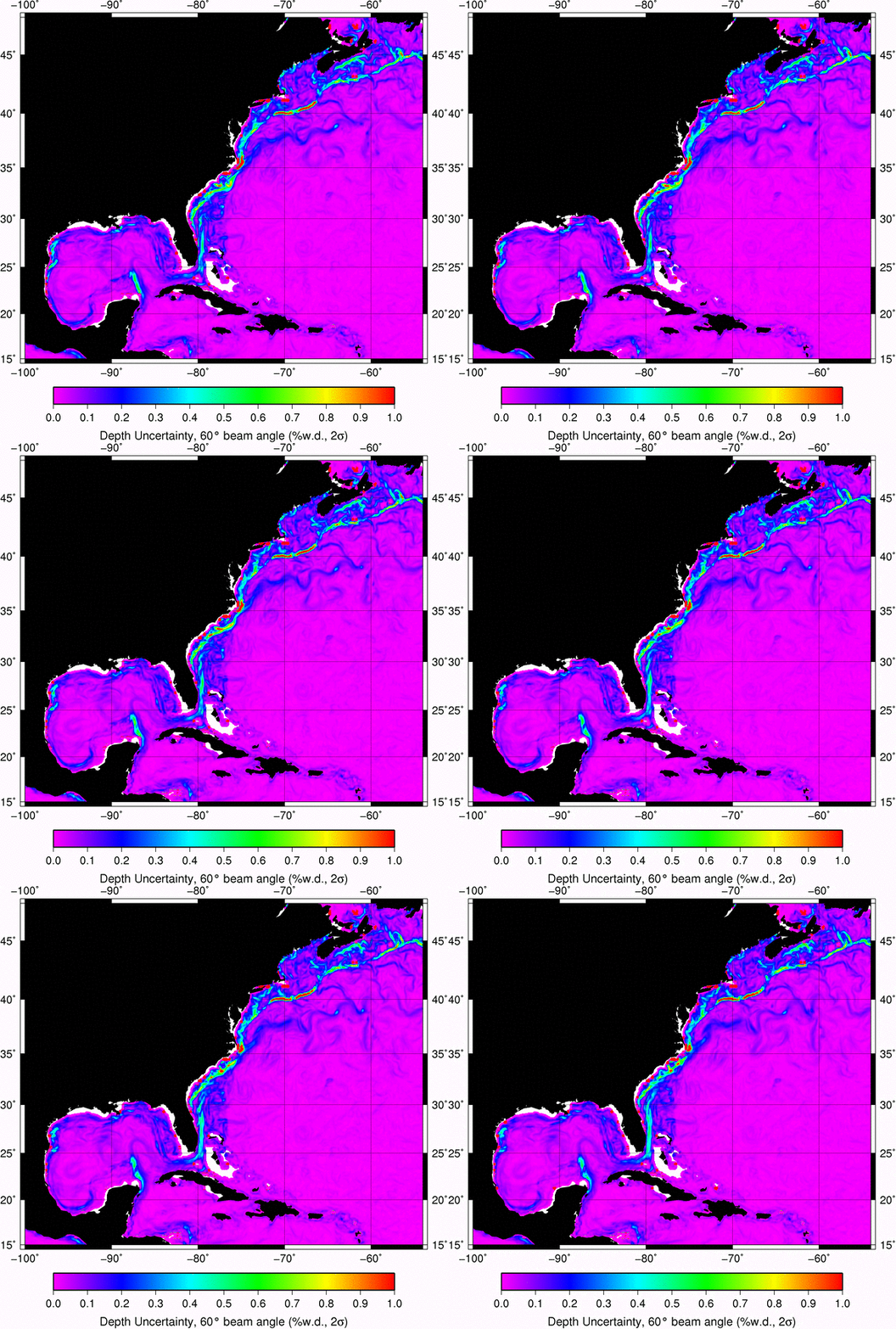
Now that I'm comfortable with the Global RTOFS grid, I decided to churn out what I call an SVP Weather Map.  This is a map that characterizes the impact of oceanographic spatial variability on multibeam echo sounding uncertainty.  For seabed mapping applications, we're usually trying to minimize the effect of this source of uncertainty.  Since its effect is usually felt most strongly on the outer most beams of the echo sounder, the analysis is run for a beam angle of 60 degrees (for a total angular sector of 120 degrees).  I'm hoping that products like this can be used to provide guidance to mappers in pre-cruise planning (helping to choose appropriate sound speed sampling instrumentation) and during acquisition (to help guide sampling intervals and locations) and perhaps in post-processing.


Here's a brief description of how it's made:  Each grid cell in RTOFS is used to construct a sound speed profile, this is then compared to its eight immediate neighbours in the grid.  The comparison is done on ray traced pathways derived from the nine sound speed profiles using a common launch angle (in this case, 30 degrees down from the horizontal).  The dispersion of the ray path solutions at their terminal locations is used to quantify the impact of the spatial variability in water mass properties.  Ray paths are resampled to a common time increment and the largest travel-time for which there are nine solutions provides us with a point cloud in the two-dimensional depth/distance ray tracing plane.  The standard deviation in the vertical dimension is computed for the point cloud and reported along with the geographic position of the grid node.  Rinse and repeat for all grid nodes and then make a map.  Here's a global map based on the RTOFS grid for Feb. 13, 2012.


We can zoom in to the Gulf Stream region and have a closer look.


Since the RTOFS grids include a 6 day forecast, we can make an animation of the Gulf Stream area (each frame is 1 day).


We can zoom in even further and see what the NOAA Ship Okeanos Explorer is going to be dealing with on their shake down cruise over the next two weeks (ship track is dashed black line).


Tuesday, December 6, 2011

ARGO data

I've been playing with ARGO data to get a sense of how well the RTOFS Global model is doing in predicting vertical temperature and salinity structure.  I eventually got a script running that would do a daily download of the current day's real-time data for use in my comparison analysis with the RTOFS Global model. Keep in mind that I plan on using this script while at sea over a limited bandwidth connection to the internet so I chose to run wget for each file instead of passing it a list of files with the -i and -base options.

The script starts by downloading the "directory file" listing all available files, it looks like this:

# Title : Profile directory file of the Argo Global Data Assembly Center
# Description : The directory file describes all individual profile files of the argo GDAC ftp site.
# Project : ARGO
# Format version : 2.0
# Date of update : 20111206174544
# FTP root number 1 : ftp://ftp.ifremer.fr/ifremer/argo/dac
# FTP root number 2 : ftp://usgodae.usgodae.org/pub/outgoing/argo/dac
# GDAC node : FNMOC
file,date,latitude,longitude,ocean,profiler_type,institution,date_update
aoml/13857/profiles/R13857_001.nc,19970729200300,0.267,-16.032,A,845,AO,20080918131927
aoml/13857/profiles/R13857_002.nc,19970809192112,0.072,-17.659,A,845,AO,20080918131929
aoml/13857/profiles/R13857_003.nc,19970820184544,0.543,-19.622,A,845,AO,20080918131931
aoml/13857/profiles/R13857_004.nc,19970831193905,1.256,-20.521,A,845,AO,20080918131933
aoml/13857/profiles/R13857_005.nc,19970911185807,0.720,-20.768,A,845,AO,20080918131934
aoml/13857/profiles/R13857_006.nc,19970922195701,1.756,-21.566,A,845,AO,20080918131936
aoml/13857/profiles/R13857_007.nc,19971003191549,2.595,-21.564,A,845,AO,20080918131938
aoml/13857/profiles/R13857_008.nc,19971014183934,1.761,-21.587,A,845,AO,20080918131940
aoml/13857/profiles/R13857_009.nc,19971025193234,1.804,-21.774,A,845,AO,20080918131941
aoml/13857/profiles/R13857_010.nc,19971105185142,1.642,-21.362,A,845,AO,20080918131943
aoml/13857/profiles/R13857_011.nc,19971116194909,1.708,-20.758,A,845,AO,20080918131945
aoml/13857/profiles/R13857_012.nc,19971127190705,2.048,-20.224,A,845,AO,20080918131947
aoml/13857/profiles/R13857_013.nc,19971208183912,2.087,-19.769,A,845,AO,20080918131948
aoml/13857/profiles/R13857_014.nc,19971219192355,2.674,-20.144,A,845,AO,20080918131950
aoml/13857/profiles/R13857_015.nc,19971230184421,2.890,-20.433,A,845,AO,20080918131952
aoml/13857/profiles/R13857_016.nc,19980110194140,2.818,-20.699,A,845,AO,20080918131954
aoml/13857/profiles/R13857_017.nc,19980121190033,2.940,-20.789,A,845,AO,20080918131956
aoml/13857/profiles/R13857_018.nc,19980201195831,3.224,-20.757,A,845,AO,20080918131957

I parse the directory file looking for a date match in the date/time field (2nd field). You could easily modify this to limit it to a specific lat/lon bounding box or any other criteria.

Here's the script:

#!/bin/bash

base_argo_url=ftp://usgodae.org/pub/outgoing/argo

# Download the profile index
time1=`stat -f "%m" ar_index_global_prof.txt.gz`
wget --timestamping $base_argo_url/ar_index_global_prof.txt.gz
time2=`stat -f "%m" ar_index_global_prof.txt.gz`

if [ $time1 -eq $time2 ]
then
        echo "Nothing to do...no changes since last run"
        exit
fi

# Get today's date
today=`date -u '+%Y%m%d'`
echo "today is" $today

mkdir $today

zcat ar_index_global_prof.txt.gz | awk -F, '{if (NR > 9 && substr($2,1,8) == '$today') print $1 }' > $today/todays_casts.txt

cd $today

num_files=`cat todays_casts.txt | wc -l`

if [ $num_files -eq 0 ]
then
        echo "Nothing to do...no files to download yet for" $today
    exit
fi

echo "Going to check" $num_files "files"

for f in `cat todays_casts.txt`; do
        echo "Doing file" $f

        if [ -e `basename $f` ]
        then
                # Skip files that have already been downloaded
                continue
        fi

        # Don't need time stamping here, we check locally for existence of the
        # .nc file so don't need to waste time requesting a listing from the FTP server
        wget $base_argo_url/dac/$f
done


What comes out of this is a directory for the current day (named yyyymmdd) with a set of netCDF files in it (.nc file extension). Each file represents a cast from a given instrument, for example 20111206/R1900847_089.nc.

I then use a python script to read the .nc files and turn them into OMG/UNB format so that I can run comparisons against casts from RTOFS Global.

#!/usr/bin/env python2.6

import glob
import netCDF4
import numpy as np
import math
import datetime as dt
import matplotlib.pyplot as plt
import os

do_plot = True

if do_plot:
    plt.figure()
    plt.subplot(1,2,1)
    plt.xlabel("Temperature, deg C")
    plt.ylabel("Pressure, dbar")
    plt.hold
    plt.subplot(1,2,2)
    plt.xlabel("Salinity, psu")
    plt.ylabel("Pressure, dbar")
    plt.hold

for name in glob.glob('*.nc'):
    file = netCDF4.Dataset(name)

    latitude = file.variables['LATITUDE'][0]
    longitude = file.variables['LONGITUDE'][0]

    if math.isnan(latitude) or math.isnan(longitude):
        print "    skipping NAN lat/lon"
        continue

    juld = file.variables['JULD'][0]

    # TODO: the reference date is stored in 'REFERENCE_DATE_TIME'
    refdate = dt.datetime(1950,1,1,0,0,0,0,tzinfo=None)
    castdate = refdate + dt.timedelta(days=juld)

    print name + " " + str(latitude) + " " + str(longitude) + " " + str(castdate)

    try:
        # Only deal with casts that have ALL the data we need
        p = file.variables['PRES'][0][:]
        t = file.variables['TEMP'][0][:]
        t_fill_value = file.variables['TEMP']._FillValue
        t_qc = file.variables['TEMP_QC'][0][:]
        s = file.variables['PSAL'][0][:]
        s_fill_value = file.variables['PSAL']._FillValue
        s_qc = file.variables['PSAL_QC'][0][:]
    except:
        continue


    # Replace masked data with NAN
    # This will fail if there is no masked data since netCDF4 returns
    # a regular numpy array if no masked data but returns a masked numpy array
    # if there is.
    try:
        t_mask = t.mask
        t[t_mask] = np.NAN
    except:
        pass

    try:
        s_mask = s.mask
        s[s_mask] = np.NAN
    except:
        pass

    try:
        p_mask = p.mask
        p[p_mask] = np.NAN
    except:
        pass

    # Now filter based on quality control flags (we want 1, 2 or 5)
    t_ind = (t_qc == '1') | (t_qc == '2') | (t_qc == '5')
    s_ind = (s_qc == '1') | (s_qc == '2') | (s_qc == '5')

    # We only want to consider valid concurrent observations of T and S
    pair_ind = t_ind & s_ind

    if do_plot:
        plt.subplot(1,2,1)
        plt.plot(t[pair_ind],-p[pair_ind]);
        plt.subplot(1,2,2)
        plt.plot(s[pair_ind],-p[pair_ind]);

    t_filt = t[pair_ind]
    s_filt = s[pair_ind]
    p_filt = p[pair_ind]
    num_samples = t_filt.size

    file.close

    if num_samples == 0:
        print "    Skipping " + name + " due to lack of data!"
        continue

if do_plot:
    plt.show()


Here's a plot of data from 2011-12-06 at 1:30PM, EST.


Here's a map showing the geographic distribution of the casts for this particular run (2011-12-06).


Still to do?  Read up more about the various QC procedures applied to ARGO data and try to automate detection of casts that will mess up my comparison analysis (large chunks of missing data, etc).  Here's a bit of light reading to get me started. 

A la prochaine...

Wednesday, November 2, 2011

Global RTOFS continued: vertical T/S profiles

I'm primarily interested in extracing depth profiles of temperature/salinity from the model, here's an example of how to do it.

import matplotlib.pyplot as plt
import netCDF4

mydate='20111101'
url_temp='http://nomads.ncep.noaa.gov:9090/dods/rtofs/rtofs_global'+mydate+'/rtofs_glo_3dz_forecast_daily_temp'
file = netCDF4.Dataset(url_temp)
lat  = file.variables['lat'][:]
lon  = file.variables['lon'][:]
data_temp = file.variables['temperature'][1,:,1000,2000]
depths=file.variables['lev'][:]
file.close
url_salt='http://nomads.ncep.noaa.gov:9090/dods/rtofs/rtofs_global'+mydate+'/rtofs_glo_3dz_forecast_daily_salt'
file = netCDF4.Dataset(url_salt)
data_salt = file.variables['salinity'][1,:,1000,2000]
plt.figure()
plt.plot(data_temp,-depths)
plt.xlabel("Potential Temperature (re 2000m)")plt.ylabel("Depth (m)")
plt.figure()
plt.plot(data_salt,-depths)
plt.xlabel("Salinity (psu)")
plt.ylabel("Depth (m)")

And that's it!  A few figures below to show the plots.


Friday, October 28, 2011

Global RTOFS

Sea surface temperature, 2011-10-27
Thanks to John Kelley for pointing this out to me.  There's a Global RTOFS ocean model running now with pretty easy access via python.  I spent last night trying to get it up and running on my MacBook Pro, here are a few notes.  Before diving into it, check out the website for Global RTOFS here.

Step 1: get some python modules

 # unpack the tarball
cd ~/installs_Mac/python_modules/
tar -zxvf netCDF4-0.9.7.tar.gz
cd netCDF4-0.9.7


# install some hdf5 libs
fink install hdf5-18

# install some netcdf4 libs, this installs hdf5 stuff also so I'm not sure the above step was needed?
fink install netcdf7

# I had to figure out where fink installed the shared libraries for netcdf4 (they're in /sw/opt/netcdf7/)

otool -L /sw/bin/ncdump
/sw/bin/ncdump:
/sw/opt/netcdf7/lib/libnetcdf.7.dylib (compatibility version 9.0.0, current version 9.1.0)
/sw/lib/libsz.2.dylib (compatibility version 3.0.0, current version 3.0.0)
/sw/lib/libhdf5_hl.7.dylib (compatibility version 8.0.0, current version 8.1.0)
/sw/lib/libhdf5.7.dylib (compatibility version 8.0.0, current version 8.1.0)
/usr/lib/libSystem.B.dylib (compatibility version 1.0.0, current version 125.2.11)
/usr/lib/libz.1.dylib (compatibility version 1.0.0, current version 1.2.3)
/sw/lib/libcurl.4.dylib (compatibility version 7.0.0, current version 7.0.0)

# set the NETCDF4_DIR based on output from otool above
export NETCDF4_DIR=/sw/opt/netcdf7/

# okay, now ready tot build the netCDF4 for python bits
# Set some enviroenment variablesexport CFLAGS=-m32
python2.6 setup.py install --home=~

# Now do the same for the basemap module
cd ~/installs_Mac/python_modules/
tar -zxvf basemap-1.0.1.tar.gz
cd basemap-1.0.1

# Need to use the default 'python' instead of the version installed through fink...wish I knew why
PATH="/Library/Frameworks/Python.framework/Versions/2.6/bin:${PATH}"
export PATH

# can't do the usual CFLAGS=-m32 (which is usually required for building against python as installed
# by fink?
unset CFLAGS
export GEOS_DIR=/sw/opt/libgeos3.2.2/
python2.6 setup.py install --home=~


Step 2.  Plot some data

Now that all goodies are installed, I tried out the script from here (note that I had to change the date to 20111027, the date provided in the example didn't work for me).

Here's my version of the script, mine does a salinity plot as well.


#!/usr/bin/env python2.6

from mpl_toolkits.basemap import Basemap
import numpy as np
import matplotlib.pyplot as plt
from pylab import *
import netCDF4


mydate='20111027'

url_temp='http://nomads.ncep.noaa.gov:9090/dods/rtofs/rtofs_global'+mydate+'/rtofs_glo_3dz_forecast_daily_temp'
file = netCDF4.Dataset(url_temp)
lat  = file.variables['lat'][:]
lon  = file.variables['lon'][:]
data_temp      = file.variables['temperature'][1,1,:,:]
file.close()


m=Basemap(projection='mill',lat_ts=10, llcrnrlon=lon.min(),urcrnrlon=lon.max(), llcrnrlat=lat.min(),urcrnrlat=lat.max(), resolution='c')
Lon, Lat = meshgrid(lon,lat)
x, y = m(Lon,Lat)

plt.figure()
cs = m.pcolormesh(x,y,data_temp,shading='flat', cmap=plt.cm.jet)

m.drawcoastlines()
m.fillcontinents()
m.drawmapboundary()
m.drawparallels(np.arange(-90.,120.,30.), labels=[1,0,0,0])
m.drawmeridians(np.arange(-180.,180.,60.), labels=[0,0,0,1])

colorbar(cs)
plt.title('Example 1: RTOFS Global Temperature')
plt.show()

# Now do the salinity
url_salt='http://nomads.ncep.noaa.gov:9090/dods/rtofs/rtofs_global'+mydate+'/rtofs_glo_3dz_forecast_daily_salt'
file = netCDF4.Dataset(url_salt)
lat  = file.variables['lat'][:]
lon  = file.variables['lon'][:]
data_salt      = file.variables['salinity'][1,1,:,:]
file.close()

m=Basemap(projection='mill',lat_ts=10, llcrnrlon=lon.min(),urcrnrlon=lon.max(), llcrnrlat=lat.min(),urcrnrlat=lat.max(), resolution='c')
Lon, Lat = meshgrid(lon,lat)
x, y = m(Lon,Lat)

plt.figure()
cs = m.pcolormesh(x,y,data_salt,shading='flat', cmap=plt.cm.jet)

m.drawcoastlines()
m.fillcontinents()
m.drawmapboundary()
m.drawparallels(np.arange(-90.,120.,30.), labels=[1,0,0,0])
m.drawmeridians(np.arange(-180.,180.,60.), labels=[0,0,0,1])

colorbar(cs)
plt.title('Example 1: RTOFS Global Salinity')
plt.show()


Results?

Here's a few screen shots of the plots I managed to generate using my script.  Next up?  Extracting vertical profiles of temperature and salinity.


Tuesday, August 10, 2010

svp_tool WOD query tool

I spent some time coding on the weekend (which would be considered sad by many, but not by me) and built a simple push button GUI interface that allows the user to refine WOD queries by instrument and month.  If I wasn't limited by the X interface, I'd add more SQL type functionality and allow for queries on any field (year, cruise ID, etc).  More work in the future I guess.  Here's a screen shot of the button bar that allows the user to choose instrument type and month of observation, the top row is for the month, the bottom row is for instrument type.  The labels on the buttons switch to UPPERCASE when selected and back to lowercase when deselected.  The query is only done after a geographic selection in the map window.  I've shown an example of several hundred CTD casts collected in the months of July, August and September in the Northwest Passage in northern Canada, one of my favourite areas that I've ever worked in.


The CTD data is plotted in the main SVP Tool window above, with sound speed, temperature and salinity plotted versus depth (left to right, respectively).

More work?  Of course.  If I turn on the debug mode of the WOD query engine, I can see that it spends an awful lot of its time unzipping the raw source data for each WMO square that it visits during the query extraction.  I'm still looking to speed this up if i can, right now the code fires off a system('gunzip -c file > tempfile'); whenever it hits a zipped WOD file.  I'm curious if it would be faster to run through zlib instead?  Kurt had also suggested converting the WOD files to a binary format so that's another option that would guarantee to bear some fruit but I really do like the elegance of sticking with the raw WOD files (easy to update, no need to reconvert with each update).  More thinking needs to be done, obviously...  Suggestions are welcome.

Wednesday, August 4, 2010

Downloading WOD

You can download the WOD files from the NODC website through an online query (http://www.nodc.noaa.gov/OC5/SELECT/dbsearch/dbsearch.html), you can also download the entire database if you look hard enough for the links (http://www.nodc.noaa.gov/OC5/WOD09/data09geo.html).  I didn't feel like pointing and clicking myself to death so I wrote this script to download the entire thing.  I also added a line in the script to compile a summary database of the CTD and XBT data for use in svp_tool.

#!/bin/bash

count=0

mkdir -p {OSD,MBT,CTD,XBT,PFL,MRB,DRB,APB,UOR,GLD}/OBS
mkdir -p {OSD,MBT,CTD,XBT,PFL,MRB,DRB,APB,UOR,GLD}/STD

echo "Downloading the WOD database"

for quadrant in 1 3 5 7
do
    for latitude in 0 1 2 3 4 5 6 7 8
    do 
        for longitude in 00 01 02 03 04 05 06 07 08 09 10 11 12 13 14 15 16 17
        do 
            let count++
            for type in OSD MBT CTD XBT PFL MRB DRB APB UOR GLD
            do 
                # Get the "observed" data
                file=$type\O$quadrant$latitude$longitude.gz
                wget http://data.nodc.noaa.gov/woa/WOD09/GEOGRAPHIC/$type/OBS/$file
                mv $file $type/OBS

                # Get the "standard level" data (observed is filtered and then
                # interpolated to standard depth levels)
                file=$type\S$quadrant$latitude$longitude.gz
                wget http://data.nodc.noaa.gov/woa/WOD09/GEOGRAPHIC/$type/STD/$file
                mv $file $type/STD
            done
        done
    done
done

echo got total $count

# Now add a tmp directory for use by the WOD library for unzipping database files
# during extraction
mkdir tmp

# Now build database of CTD and XBT data
echo "Building a CTD/XBT summary database"
wod2db3 -out wod.db3 CTD/OBS/CTDO*gz XBT/OBS/XBTO*gz
echo
echo
echo "Add WOD_PATH="`pwd` "as an environment variable"
echo "Add WOD_DATABASE_NAME="`pwd`"/"wod.db3 "as an environment variable"

exit

Tuesday, August 3, 2010

sqlite3 and the World Ocean Database, continued

I got things sped up quite a bit by directly querying the database file I had created (see my last post) and by returning the query results as an array of watercolumn structures instead of writing them to disk and then reading them in again in my svp_tool.

Here's the bit of code that deals with building the query:

int wod_extract_profiles (WOD_Reader * wod_reader)
{
    int rc;
    char *zErrMsg = 0;

    int i;
    int offset;

    char month_list[50];
    char instrument_list[50];
    char sql_string[500];

    memset(month_list,0,50);
    memset(instrument_list,0,50);
    memset(sql_string,0,500);

    // There must be easier ways to do this than the way I'm doing it
    month_list[0]='(';
    offset = 1;
    for (i=1;i<=12;i++)
    {
        if (!wod_reader->query_bounds.month[i]) continue;
        sprintf(&month_list[offset],"%d,",i);
        offset = strlen(month_list);
    }
    month_list[offset-1]=')';
    // There must be easier ways to do this than the way I'm doing it
    instrument_list[0]='(';
    offset = 1;
    for (i=1;i<=WOD_NUM_TYPES;i++)
    {
        if (!wod_reader->query_bounds.instrument[i]) continue;
        sprintf(&instrument_list[offset],"%d,",i);
        offset = strlen(instrument_list);
    }
    instrument_list[offset-1]=')';

    // Check some of the query bounds before we start
    if (wod_reader->query_bounds.longitude_west > 180) wod_reader->query_bounds.longitude_west -= 360;
    if (wod_reader->query_bounds.longitude_east > 180) wod_reader->query_bounds.longitude_east -= 360;

    // Form the query: select records based on geo/time bounds and then sort in such a way that
    // the hits return in WOD filename order to minimize jumping around between files
    sprintf(sql_string,"SELECT * FROM tbl1 WHERE latitude > %.3f AND latitude < %.3f AND longitude > %.3f AND longitude < %.3f AND month in %s AND instrument in %s ORDER BY instrument, observed, quadrant, wmo_lat, wmo_lon, year, month, day;",
        wod_reader->query_bounds.latitude_south, wod_reader->query_bounds.latitude_north,
        wod_reader->query_bounds.longitude_west, wod_reader->query_bounds.longitude_east,month_list,instrument_list);

    if (wod_reader->debug) printf("Doing SQL string %s\n",sql_string);

    printf("Doing WOD query...patience\n");

    // Do the query and deal with the results
    rc = sqlite3_exec(wod_reader->db, sql_string, wod_query_callback, wod_reader, &zErrMsg);
    if (rc) error("SQL error: %s",zErrMsg);

    return(0);
}


The callback function (wod_query_callback) in the sqlite3_exec call deals with the query results one at a time.  Here'swhat's going on in there:

static int wod_query_callback(void * reader_in, int argc, char **argv, char **azColName)
{
    int i;
    int iend;

    int got_new_file;

    WOD_Reader *wod_reader;

    char * inname = NULL;

    int file_offset, num_bytes;

    int instrument, observed, quadrant, wmo_lat, wmo_lon;

    char type_lowercase[4];
    char type_uppercase[4];

    memset(type_uppercase,0,4);
    memset(type_lowercase,0,4);

    wod_reader = (WOD_Reader *) reader_in;

    got_new_file = 0;

    // Parse the output record from the query
    for(i=0; i
    {
        if (wod_reader->debug) printf("%s = %s\n", azColName[i], argv[i] ? argv[i] : "NULL");

        if (!strcmp(azColName[i],"instrument"))
        {
            instrument = atoi(argv[i]);
            if (instrument != wod_reader->instrument) got_new_file++;
        }
        else if (!strcmp(azColName[i],"observed"))
        {
            observed = atoi(argv[i]);
            if (observed != wod_reader->observed) got_new_file++;
        }
        else if (!strcmp(azColName[i],"quadrant"))
        {
            quadrant = atoi(argv[i]);
            if (quadrant != wod_reader->quadrant) got_new_file++;
        }
        else if (!strcmp(azColName[i],"wmo_lat"))
        {
            wmo_lat = atoi(argv[i]);
            if (wmo_lat != wod_reader->wmo_lat) got_new_file++;
        }
        else if (!strcmp(azColName[i],"wmo_lon"))
        {
            wmo_lon = atoi(argv[i]);
            if (wmo_lon != wod_reader->wmo_lon) got_new_file++;
        }
        else if (!strcmp(azColName[i],"file_offset"))
        {
            file_offset = atoi(argv[i]);
        }
        else if (!strcmp(azColName[i],"num_bytes"))
        {
            num_bytes = atoi(argv[i]);
        }
    }

    if (got_new_file)
    {
        if (wod_reader->debug) printf("Need to load a new WOD file!!\n");

        // Got a new file, so close the old one...
        wod_close_file(wod_reader);

        memcpy(type_uppercase,wod_data_types[instrument],3);
        type_lowercase[0] = tolower(type_uppercase[0]);
        type_lowercase[1] = tolower(type_uppercase[1]);
        type_lowercase[2] = tolower(type_uppercase[2]);

        // Build up the filename
        inname = calloc(strlen(wod_reader->wod_path)+50,1);
        memset(inname,0,strlen(wod_reader->wod_path)+50);

        // this the type of path that we're trying to construct: ctd/OBS/CTDO7807.gz
        sprintf(inname,"%s/%s/OBS/%sO%d%d%0.2d.gz",
        wod_reader->wod_path,type_lowercase,type_uppercase,quadrant,wmo_lat,wmo_lon);

        if (wod_open_file(wod_reader,inname))
        {
            sprintf(inname,"%s/%s/OBS/%sO%d%d%0.2d",wod_reader->wod_path,type_lowercase,type_uppercase,
                quadrant,wmo_lat,wmo_lon);
            if (wod_open_file(wod_reader,inname))
            {
                printf("Can't open file %s ... non-existant??\n",inname);
                free(inname);
                inname = NULL;
                return(1);
            }
        }

        if (inname) free(inname);
        inname = NULL;
    }

    if (wod_reader->debug) printf("%s: fseeking to %d for %d bytes\n",wod_reader->fname, file_offset,num_bytes);

    // Seek to the right spot in the file
    fseek(wod_reader->fp,file_offset,SEEK_SET);

    // Now read the profile at that location
    if ((iend = oclread (wod_reader)) == -1)
    {
        wod_close_file(wod_reader);
        return(1);
    }

    // Convert the cast to OMG SVP format, this updates the extracted_watercolumns array
    wod2svp(wod_reader);

    return 0;
}


Now I've just got to build a query building utility in the graphical end that lets the user select instrument, month and/or other fields.  Geographic bounds are currently selected by lasso in the map viewer and the month defaults to the current month.

I'm also planning on speeding up the oclread function (was delivered with the free NODC code that came with the WOD), right now it's reading things a single field at a time and I think it can be sped up a bit by reading the entire cast into memory and then parsing it from there.

jb