I got the IT guys at work to find a dusty old PC and to install Linux on it. Tucked safely away in a corner somewhere, it's running a daily script that downloads the RTOFS 144 hour forecast and then produces SVP Weather Maps. These are then dumped on the FTP server where they are publicly available after an anonymous FTP login.
You can find the daily forecast here: Today's SVP Weather Map.
If you're a command line scripter, you might be interested in the details of the script:
#!/bin/bash
source ~/.bash_profile
# http://nomads.ncep.noaa.gov/pub/data/nccf/com/rtofs/prod/rtofs.20120212/rtofs_glo_3dz_f024_daily_3zsio.nc
base_url="http://nomads.ncep.noaa.gov/pub/data/nccf/com/rtofs/prod/rtofs"
# This forces us to download yesterday's grids since we want the full 144 hour forecast and that won't be
# available until the end of today.
#day=`date -v -1d '+%Y%m%d'`
day=`date --date="yesterday" '+%Y%m%d'`
file_prefix="rtofs_glo_3dz_f"
file_suffix_salinity="_daily_3zsio.nc"
file_suffix_temperature="_daily_3ztio.nc"
cd /home/jbeaudoin/data/RTOFS
mkdir -p $day
cd $day
for hour in 024 048 072 096 120 144;
do
echo "Doing hour" $hour
name=$base_url.$day/$file_prefix$hour$file_suffix_temperature
echo "Retrieving" $name
wget -N $name
name=$base_url.$day/$file_prefix$hour$file_suffix_salinity
echo "Retrieving" $name
wget -N $name
temperature_file=$file_prefix$hour$file_suffix_temperature
salinity_file=$file_prefix$hour$file_suffix_salinity
echo "Doing " $hour $temperature_file $salinity_file
# Do the uncertainty analysis, it dumps out a results_YYYYMMDD.dat file
svp_rtofs \
-angular_sector 120 \
-draft 5 \
-t $temperature_file \
-s $salinity_file
# Daily download footprint is 24GB. No need to hang on
# to these so clearing them out.
rm $temperature_file
rm $salinity_file
done
rm .gmt*
makecpt -Crainbow -T0/0.5/0.1 -Z -D > uncertainty.cpt
gmtset CHAR_ENCODING ISOLatin1Encoding
today=`date '+%Y%m%d'`
for f in *.dat;
do
prefix=`get_prefix $f`
# results_20120524.dat
datestamp=`basename $prefix | awk -F_ '{print $2}' `
rm $prefix.grd
cat $f | awk '{if (NF == 3) {printf("%.7f %.7f %.2f\n", $2,$1,$3);} }' | nearneighbor -I3m -S10m -R-180/180/-75/80 -N8/1 -G$prefix.grd
grdimage $prefix.grd -R -JM8i -K -Xc -Y1.75i -Q -Cuncertainty.cpt -K > $prefix.ps
pscoast -R -J -O -K -Gblack -W0.1p -Dl -A500/0/1 -B30g30/20g20 -Wthinner,black -U >> $prefix.ps
echo "60 50 20 0 1 BL $datestamp" | pstext -R -J -O -Gyellow -K >> $prefix.ps
psscale --LABEL_FONT_SIZE=15p -D4.0i/-0.5i/6i/0.3ih -O -Cuncertainty.cpt -B0.1:"Depth Uncertainty, 60\260 beam angle (%w.d., 2@~s@~)": >> $prefix.ps
ps2raster -A -Tg -E600 $prefix.ps
convert -rotate 90 $prefix.png $prefix.png
if [ $datestamp -eq $today ]; then
# We always provide a "today" file so that people can
# bookmark the today file on the FTP site.
cp $prefix.png today.png
fi
gzip -f $f
done
At the end of the script, the .png files and the .grd files are uploaded to the CCOM FTP site.
Friday, May 25, 2012


Tuesday, February 28, 2012
More Mac Mini wrestling...
Okay, so I didn't quite give up when I said I did. More notes on this install.
1) Downloaded Xcode 4.3 and then tried a fink install but it whined about not finding a c compiler. After some googling, I found out that you need to download the command line tools from the "Downloads" tab within Xcode's preferences. This is pretty complicated for us "hello_world.c" folks.
2) After doing that, trying a fink installation again. Jumped into the fink install directory and did "./bootstrap" and ran with all the defaults. It attempted to make a new /sw2 directory so I killed the job and did 'sudo mv /sw /sw_fail' to get that out of the way then launched the bootstrap script again.
After a few minutes:

3) After fink installed, I typed:
/sw/bin/pathsetup.sh
This setup the fink path by creating a .profile file in my ~ (one wasn't there already, not sure what it would have done if one was).
Then typed:
fink selfupdate-rsync
fink index -f
That's it and probably a good spot to stop for tonight...
1) Downloaded Xcode 4.3 and then tried a fink install but it whined about not finding a c compiler. After some googling, I found out that you need to download the command line tools from the "Downloads" tab within Xcode's preferences. This is pretty complicated for us "hello_world.c" folks.
2) After doing that, trying a fink installation again. Jumped into the fink install directory and did "./bootstrap" and ran with all the defaults. It attempted to make a new /sw2 directory so I killed the job and did 'sudo mv /sw /sw_fail' to get that out of the way then launched the bootstrap script again.
After a few minutes:

3) After fink installed, I typed:
/sw/bin/pathsetup.sh
This setup the fink path by creating a .profile file in my ~ (one wasn't there already, not sure what it would have done if one was).
Then typed:
fink selfupdate-rsync
fink index -f
That's it and probably a good spot to stop for tonight...
Wrestling with a Mac Mini
So, I got a Mac Mini for home. Mostly for hooking up to the TV, watching netflix, looking at family pictures and listening to music. I thought I'd set it up to build all the software that I've been working with (see post from April 2010). Here are some notes on what I did...
1) From my first dealings with building OMG software on a MAC (April, 2010), I installed Xcode. It seems the only way to download this now is to do it through the app store, and they want my credit card information when it's supposed to be a free download. This made me angry...so, I'm trying out an alternative approach:
https://github.com/kennethreitz/osx-gcc-installer/downloads
I downloaded the following:
The lovely .pkg file unpacked into a wizard that promptly installed without issue.
2) Now for fink: http://www.finkproject.org/download/srcdist.php.
It warns that Xcode is required...let's see about that. I followed the instructions on the fink install docs page, jumped onto the command line and dove into the unpacked tarball directory. Typed "./bootstrap" and found that it wanted the Java Runtime Environment installed...somehow the command line install script fired off a software update to do this. Magic.
Okay, running "./bootstrap" again and it's asking me some questions. I just went with all the defaults and off it goes, curl'ing away. It died for want of an Xcode installation. I am, however, still angry. Time to dig out the old .dmg from when I installed Xcode on my work laptop almost 2 years ago. How much could gcc have changed since then???
3) Trying to install Xcode 3.2.1 from a nearly two year old .dmg. The 'gcc' install said it was okay to install Xcode right on top of it, so I didn't do anything to undo step (1). Ran off the .dmg and it installed without whining at all.
4) Now for fink, part II. Back on the console, "./bootstrap" again and I get:
ERROR: This version of fink needs at least Xcode 4.1 on this OS X version.
5) I am still angry, so I'm willing to try an older version of fink. Luckily, I kept the tarball for the fink-0.29.10 install I did on my work laptop. At this point, I just want to see if I can do this without giving the App Store my credit card as a matter of principle...and barf, it's not happy:
Argument "10.7 does not match the expected value of . Please run `..." isn't numeric in exit at /Users/amy/Documents/installs/build/fink-0.29.10/perlmod/Fink/Services.pm line 1381.
6) I'm tired and I give up. Let's get out the credit card just to let the App Store let me download some free software. What a bunch of A-holes.
That's about enough for tonight. I know myself well enough to stop now: I might hurt some files.
1) From my first dealings with building OMG software on a MAC (April, 2010), I installed Xcode. It seems the only way to download this now is to do it through the app store, and they want my credit card information when it's supposed to be a free download. This made me angry...so, I'm trying out an alternative approach:
https://github.com/kennethreitz/osx-gcc-installer/downloads
I downloaded the following:
GCC-10.7-v2.pkg — GCC Installer for OSX 10.7+, Version 2 (includes X11 headers, bugfixes).
The lovely .pkg file unpacked into a wizard that promptly installed without issue.
2) Now for fink: http://www.finkproject.org/download/srcdist.php.
It warns that Xcode is required...let's see about that. I followed the instructions on the fink install docs page, jumped onto the command line and dove into the unpacked tarball directory. Typed "./bootstrap" and found that it wanted the Java Runtime Environment installed...somehow the command line install script fired off a software update to do this. Magic.
Okay, running "./bootstrap" again and it's asking me some questions. I just went with all the defaults and off it goes, curl'ing away. It died for want of an Xcode installation. I am, however, still angry. Time to dig out the old .dmg from when I installed Xcode on my work laptop almost 2 years ago. How much could gcc have changed since then???
3) Trying to install Xcode 3.2.1 from a nearly two year old .dmg. The 'gcc' install said it was okay to install Xcode right on top of it, so I didn't do anything to undo step (1). Ran off the .dmg and it installed without whining at all.
4) Now for fink, part II. Back on the console, "./bootstrap" again and I get:
ERROR: This version of fink needs at least Xcode 4.1 on this OS X version.
5) I am still angry, so I'm willing to try an older version of fink. Luckily, I kept the tarball for the fink-0.29.10 install I did on my work laptop. At this point, I just want to see if I can do this without giving the App Store my credit card as a matter of principle...and barf, it's not happy:
Argument "10.7 does not match the expected value of . Please run `..." isn't numeric in exit at /Users/amy/Documents/installs/build/fink-0.29.10/perlmod/Fink/Services.pm line 1381.
6) I'm tired and I give up. Let's get out the credit card just to let the App Store let me download some free software. What a bunch of A-holes.
That's about enough for tonight. I know myself well enough to stop now: I might hurt some files.
Wednesday, February 15, 2012
Global RTOFS: SVP Weather Map
Now that I'm comfortable with the Global RTOFS grid, I decided to churn out what I call an SVP Weather Map. This is a map that characterizes the impact of oceanographic spatial variability on multibeam echo sounding uncertainty. For seabed mapping applications, we're usually trying to minimize the effect of this source of uncertainty. Since its effect is usually felt most strongly on the outer most beams of the echo sounder, the analysis is run for a beam angle of 60 degrees (for a total angular sector of 120 degrees). I'm hoping that products like this can be used to provide guidance to mappers in pre-cruise planning (helping to choose appropriate sound speed sampling instrumentation) and during acquisition (to help guide sampling intervals and locations) and perhaps in post-processing.
Here's a brief description of how it's made: Each grid cell in RTOFS is used to construct a sound speed profile, this is then compared to its eight immediate neighbours in the grid. The comparison is done on ray traced pathways derived from the nine sound speed profiles using a common launch angle (in this case, 30 degrees down from the horizontal). The dispersion of the ray path solutions at their terminal locations is used to quantify the impact of the spatial variability in water mass properties. Ray paths are resampled to a common time increment and the largest travel-time for which there are nine solutions provides us with a point cloud in the two-dimensional depth/distance ray tracing plane. The standard deviation in the vertical dimension is computed for the point cloud and reported along with the geographic position of the grid node. Rinse and repeat for all grid nodes and then make a map. Here's a global map based on the RTOFS grid for Feb. 13, 2012.

We can zoom in to the Gulf Stream region and have a closer look.

Since the RTOFS grids include a 6 day forecast, we can make an animation of the Gulf Stream area (each frame is 1 day).

We can zoom in even further and see what the NOAA Ship Okeanos Explorer is going to be dealing with on their shake down cruise over the next two weeks (ship track is dashed black line).

Here's a brief description of how it's made: Each grid cell in RTOFS is used to construct a sound speed profile, this is then compared to its eight immediate neighbours in the grid. The comparison is done on ray traced pathways derived from the nine sound speed profiles using a common launch angle (in this case, 30 degrees down from the horizontal). The dispersion of the ray path solutions at their terminal locations is used to quantify the impact of the spatial variability in water mass properties. Ray paths are resampled to a common time increment and the largest travel-time for which there are nine solutions provides us with a point cloud in the two-dimensional depth/distance ray tracing plane. The standard deviation in the vertical dimension is computed for the point cloud and reported along with the geographic position of the grid node. Rinse and repeat for all grid nodes and then make a map. Here's a global map based on the RTOFS grid for Feb. 13, 2012.

We can zoom in to the Gulf Stream region and have a closer look.

Since the RTOFS grids include a 6 day forecast, we can make an animation of the Gulf Stream area (each frame is 1 day).
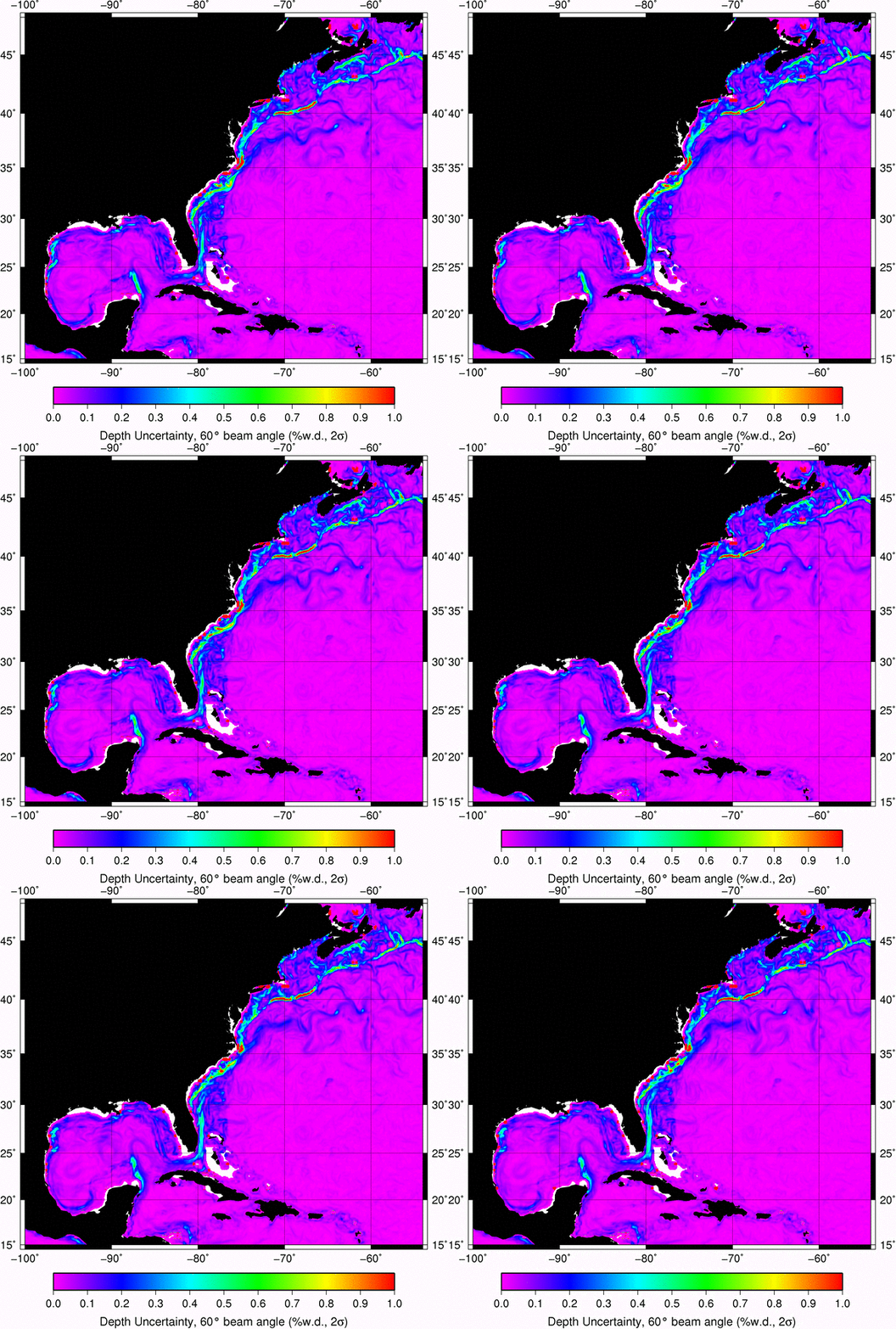
We can zoom in even further and see what the NOAA Ship Okeanos Explorer is going to be dealing with on their shake down cruise over the next two weeks (ship track is dashed black line).

Tuesday, December 6, 2011
ARGO data
I've been playing with ARGO data to get a sense of how well the RTOFS Global model is doing in predicting vertical temperature and salinity structure. I eventually got a script running that would do a daily download of the current day's real-time data for use in my comparison analysis with the RTOFS Global model. Keep in mind that I plan on using this script while at sea over a limited bandwidth connection to the internet so I chose to run wget for each file instead of passing it a list of files with the -i and -base options.
The script starts by downloading the "directory file" listing all available files, it looks like this:
I parse the directory file looking for a date match in the date/time field (2nd field). You could easily modify this to limit it to a specific lat/lon bounding box or any other criteria.
Here's the script:
What comes out of this is a directory for the current day (named yyyymmdd) with a set of netCDF files in it (.nc file extension). Each file represents a cast from a given instrument, for example 20111206/R1900847_089.nc.
I then use a python script to read the .nc files and turn them into OMG/UNB format so that I can run comparisons against casts from RTOFS Global.
Here's a plot of data from 2011-12-06 at 1:30PM, EST.

Here's a map showing the geographic distribution of the casts for this particular run (2011-12-06).

Still to do? Read up more about the various QC procedures applied to ARGO data and try to automate detection of casts that will mess up my comparison analysis (large chunks of missing data, etc). Here's a bit of light reading to get me started.
A la prochaine...
The script starts by downloading the "directory file" listing all available files, it looks like this:
# Title : Profile directory file of the Argo Global Data Assembly Center
# Description : The directory file describes all individual profile files of the argo GDAC ftp site.
# Project : ARGO
# Format version : 2.0
# Date of update : 20111206174544
# FTP root number 1 : ftp://ftp.ifremer.fr/ifremer/argo/dac
# FTP root number 2 : ftp://usgodae.usgodae.org/pub/outgoing/argo/dac
# GDAC node : FNMOC
file,date,latitude,longitude,ocean,profiler_type,institution,date_update
aoml/13857/profiles/R13857_001.nc,19970729200300,0.267,-16.032,A,845,AO,20080918131927
aoml/13857/profiles/R13857_002.nc,19970809192112,0.072,-17.659,A,845,AO,20080918131929
aoml/13857/profiles/R13857_003.nc,19970820184544,0.543,-19.622,A,845,AO,20080918131931
aoml/13857/profiles/R13857_004.nc,19970831193905,1.256,-20.521,A,845,AO,20080918131933
aoml/13857/profiles/R13857_005.nc,19970911185807,0.720,-20.768,A,845,AO,20080918131934
aoml/13857/profiles/R13857_006.nc,19970922195701,1.756,-21.566,A,845,AO,20080918131936
aoml/13857/profiles/R13857_007.nc,19971003191549,2.595,-21.564,A,845,AO,20080918131938
aoml/13857/profiles/R13857_008.nc,19971014183934,1.761,-21.587,A,845,AO,20080918131940
aoml/13857/profiles/R13857_009.nc,19971025193234,1.804,-21.774,A,845,AO,20080918131941
aoml/13857/profiles/R13857_010.nc,19971105185142,1.642,-21.362,A,845,AO,20080918131943
aoml/13857/profiles/R13857_011.nc,19971116194909,1.708,-20.758,A,845,AO,20080918131945
aoml/13857/profiles/R13857_012.nc,19971127190705,2.048,-20.224,A,845,AO,20080918131947
aoml/13857/profiles/R13857_013.nc,19971208183912,2.087,-19.769,A,845,AO,20080918131948
aoml/13857/profiles/R13857_014.nc,19971219192355,2.674,-20.144,A,845,AO,20080918131950
aoml/13857/profiles/R13857_015.nc,19971230184421,2.890,-20.433,A,845,AO,20080918131952
aoml/13857/profiles/R13857_016.nc,19980110194140,2.818,-20.699,A,845,AO,20080918131954
aoml/13857/profiles/R13857_017.nc,19980121190033,2.940,-20.789,A,845,AO,20080918131956
aoml/13857/profiles/R13857_018.nc,19980201195831,3.224,-20.757,A,845,AO,20080918131957
I parse the directory file looking for a date match in the date/time field (2nd field). You could easily modify this to limit it to a specific lat/lon bounding box or any other criteria.
Here's the script:
#!/bin/bash

base_argo_url=ftp://usgodae.org/pub/outgoing/argo

# Download the profile index
time1=`stat -f "%m" ar_index_global_prof.txt.gz`
wget --timestamping $base_argo_url/ar_index_global_prof.txt.gz
time2=`stat -f "%m" ar_index_global_prof.txt.gz`

if [ $time1 -eq $time2 ]
then
        echo "Nothing to do...no changes since last run"
        exit
fi

# Get today's date
today=`date -u '+%Y%m%d'`
echo "today is" $today

mkdir $today

zcat ar_index_global_prof.txt.gz | awk -F, '{if (NR > 9 && substr($2,1,8) == '$today') print $1 }' > $today/todays_casts.txt

cd $today

num_files=`cat todays_casts.txt | wc -l`

if [ $num_files -eq 0 ]
then
        echo "Nothing to do...no files to download yet for" $today
    exit
fi

echo "Going to check" $num_files "files"

for f in `cat todays_casts.txt`; do
        echo "Doing file" $f

        if [ -e `basename $f` ]
        then
                # Skip files that have already been downloaded
                continue
        fi

        # Don't need time stamping here, we check locally for existence of the
        # .nc file so don't need to waste time requesting a listing from the FTP server
        wget $base_argo_url/dac/$f
done
What comes out of this is a directory for the current day (named yyyymmdd) with a set of netCDF files in it (.nc file extension). Each file represents a cast from a given instrument, for example 20111206/R1900847_089.nc.
I then use a python script to read the .nc files and turn them into OMG/UNB format so that I can run comparisons against casts from RTOFS Global.
#!/usr/bin/env python2.6

import glob
import netCDF4
import numpy as np
import math
import datetime as dt
import matplotlib.pyplot as plt
import os

do_plot = True

if do_plot:
    plt.figure()
    plt.subplot(1,2,1)
    plt.xlabel("Temperature, deg C")
    plt.ylabel("Pressure, dbar")
    plt.hold
    plt.subplot(1,2,2)
    plt.xlabel("Salinity, psu")
    plt.ylabel("Pressure, dbar")
    plt.hold

for name in glob.glob('*.nc'):
    file = netCDF4.Dataset(name)

    latitude = file.variables['LATITUDE'][0]
    longitude = file.variables['LONGITUDE'][0]

    if math.isnan(latitude) or math.isnan(longitude):
        print "    skipping NAN lat/lon"
        continue

    juld = file.variables['JULD'][0]

    # TODO: the reference date is stored in 'REFERENCE_DATE_TIME'
    refdate = dt.datetime(1950,1,1,0,0,0,0,tzinfo=None)
    castdate = refdate + dt.timedelta(days=juld)

    print name + " " + str(latitude) + " " + str(longitude) + " " + str(castdate)

    try:
        # Only deal with casts that have ALL the data we need
        p = file.variables['PRES'][0][:]
        t = file.variables['TEMP'][0][:]
        t_fill_value = file.variables['TEMP']._FillValue
        t_qc = file.variables['TEMP_QC'][0][:]
        s = file.variables['PSAL'][0][:]
        s_fill_value = file.variables['PSAL']._FillValue
        s_qc = file.variables['PSAL_QC'][0][:]
    except:
        continue


    # Replace masked data with NAN
    # This will fail if there is no masked data since netCDF4 returns
    # a regular numpy array if no masked data but returns a masked numpy array
    # if there is.
    try:
        t_mask = t.mask
        t[t_mask] = np.NAN
    except:
        pass

    try:
        s_mask = s.mask
        s[s_mask] = np.NAN
    except:
        pass

    try:
        p_mask = p.mask
        p[p_mask] = np.NAN
    except:
        pass

    # Now filter based on quality control flags (we want 1, 2 or 5)
    t_ind = (t_qc == '1') | (t_qc == '2') | (t_qc == '5')
    s_ind = (s_qc == '1') | (s_qc == '2') | (s_qc == '5')

    # We only want to consider valid concurrent observations of T and S
    pair_ind = t_ind & s_ind

    if do_plot:
        plt.subplot(1,2,1)
        plt.plot(t[pair_ind],-p[pair_ind]);
        plt.subplot(1,2,2)
        plt.plot(s[pair_ind],-p[pair_ind]);

    t_filt = t[pair_ind]
    s_filt = s[pair_ind]
    p_filt = p[pair_ind]
    num_samples = t_filt.size

    file.close

    if num_samples == 0:
        print "    Skipping " + name + " due to lack of data!"
        continue

if do_plot:
    plt.show()
Here's a plot of data from 2011-12-06 at 1:30PM, EST.

Here's a map showing the geographic distribution of the casts for this particular run (2011-12-06).

Still to do? Read up more about the various QC procedures applied to ARGO data and try to automate detection of casts that will mess up my comparison analysis (large chunks of missing data, etc). Here's a bit of light reading to get me started.
A la prochaine...
Wednesday, November 2, 2011
Global RTOFS continued: vertical T/S profiles
I'm primarily interested in extracing depth profiles of temperature/salinity from the model, here's an example of how to do it.
import matplotlib.pyplot as plt
import netCDF4
mydate='20111101'
url_temp='http://nomads.ncep.noaa.gov:9090/dods/rtofs/rtofs_global'+mydate+'/rtofs_glo_3dz_forecast_daily_temp'
file = netCDF4.Dataset(url_temp)
lat = file.variables['lat'][:]
lon = file.variables['lon'][:]
data_temp = file.variables['temperature'][1,:,1000,2000]
depths=file.variables['lev'][:]
file.close
url_salt='http://nomads.ncep.noaa.gov:9090/dods/rtofs/rtofs_global'+mydate+'/rtofs_glo_3dz_forecast_daily_salt'
file = netCDF4.Dataset(url_salt)
data_salt = file.variables['salinity'][1,:,1000,2000]
plt.figure()
plt.plot(data_temp,-depths)
plt.xlabel("Potential Temperature (re 2000m)")plt.ylabel("Depth (m)")
plt.figure()
plt.plot(data_salt,-depths)
plt.xlabel("Salinity (psu)")
plt.ylabel("Depth (m)")
And that's it! A few figures below to show the plots.


import matplotlib.pyplot as plt
import netCDF4
mydate='20111101'
url_temp='http://nomads.ncep.noaa.gov:9090/dods/rtofs/rtofs_global'+mydate+'/rtofs_glo_3dz_forecast_daily_temp'
file = netCDF4.Dataset(url_temp)
lat = file.variables['lat'][:]
lon = file.variables['lon'][:]
data_temp = file.variables['temperature'][1,:,1000,2000]
depths=file.variables['lev'][:]
file.close
url_salt='http://nomads.ncep.noaa.gov:9090/dods/rtofs/rtofs_global'+mydate+'/rtofs_glo_3dz_forecast_daily_salt'
file = netCDF4.Dataset(url_salt)
data_salt = file.variables['salinity'][1,:,1000,2000]
plt.figure()
plt.plot(data_temp,-depths)
plt.xlabel("Potential Temperature (re 2000m)")plt.ylabel("Depth (m)")
plt.figure()
plt.plot(data_salt,-depths)
plt.xlabel("Salinity (psu)")
plt.ylabel("Depth (m)")
And that's it! A few figures below to show the plots.


Friday, October 28, 2011
Global RTOFS
 |
| Sea surface temperature, 2011-10-27 |
Step 1: get some python modules
# unpack the tarball
cd ~/installs_Mac/python_modules/
tar -zxvf netCDF4-0.9.7.tar.gz
cd netCDF4-0.9.7
# install some hdf5 libs
fink install hdf5-18
# install some netcdf4 libs, this installs hdf5 stuff also so I'm not sure the above step was needed?
fink install netcdf7
# I had to figure out where fink installed the shared libraries for netcdf4 (they're in /sw/opt/netcdf7/)
otool -L /sw/bin/ncdump
/sw/bin/ncdump:
/sw/opt/netcdf7/lib/libnetcdf.7.dylib (compatibility version 9.0.0, current version 9.1.0)
/sw/lib/libsz.2.dylib (compatibility version 3.0.0, current version 3.0.0)
/sw/lib/libhdf5_hl.7.dylib (compatibility version 8.0.0, current version 8.1.0)
/sw/lib/libhdf5.7.dylib (compatibility version 8.0.0, current version 8.1.0)
/usr/lib/libSystem.B.dylib (compatibility version 1.0.0, current version 125.2.11)
/usr/lib/libz.1.dylib (compatibility version 1.0.0, current version 1.2.3)
/sw/lib/libcurl.4.dylib (compatibility version 7.0.0, current version 7.0.0)
# set the NETCDF4_DIR based on output from otool above
export NETCDF4_DIR=/sw/opt/netcdf7/
# okay, now ready tot build the netCDF4 for python bits
# Set some enviroenment variablesexport CFLAGS=-m32
python2.6 setup.py install --home=~
# Now do the same for the basemap module
cd ~/installs_Mac/python_modules/
tar -zxvf basemap-1.0.1.tar.gz
cd basemap-1.0.1
# Need to use the default 'python' instead of the version installed through fink...wish I knew why
PATH="/Library/Frameworks/Python.framework/Versions/2.6/bin:${PATH}"
export PATH
# can't do the usual CFLAGS=-m32 (which is usually required for building against python as installed
# by fink?
unset CFLAGS
export GEOS_DIR=/sw/opt/libgeos3.2.2/
python2.6 setup.py install --home=~
Step 2. Plot some data
Now that all goodies are installed, I tried out the script from here (note that I had to change the date to 20111027, the date provided in the example didn't work for me).
Here's my version of the script, mine does a salinity plot as well.
#!/usr/bin/env python2.6
from mpl_toolkits.basemap import Basemap
import numpy as np
import matplotlib.pyplot as plt
from pylab import *
import netCDF4
mydate='20111027'
url_temp='http://nomads.ncep.noaa.gov:9090/dods/rtofs/rtofs_global'+mydate+'/rtofs_glo_3dz_forecast_daily_temp'
file = netCDF4.Dataset(url_temp)
lat = file.variables['lat'][:]
lon = file.variables['lon'][:]
data_temp = file.variables['temperature'][1,1,:,:]
file.close()
m=Basemap(projection='mill',lat_ts=10, llcrnrlon=lon.min(),urcrnrlon=lon.max(), llcrnrlat=lat.min(),urcrnrlat=lat.max(), resolution='c')
Lon, Lat = meshgrid(lon,lat)
x, y = m(Lon,Lat)
plt.figure()
cs = m.pcolormesh(x,y,data_temp,shading='flat', cmap=plt.cm.jet)
m.drawcoastlines()
m.fillcontinents()
m.drawmapboundary()
m.drawparallels(np.arange(-90.,120.,30.), labels=[1,0,0,0])
m.drawmeridians(np.arange(-180.,180.,60.), labels=[0,0,0,1])
colorbar(cs)
plt.title('Example 1: RTOFS Global Temperature')
plt.show()
# Now do the salinity
url_salt='http://nomads.ncep.noaa.gov:9090/dods/rtofs/rtofs_global'+mydate+'/rtofs_glo_3dz_forecast_daily_salt'
file = netCDF4.Dataset(url_salt)
lat = file.variables['lat'][:]
lon = file.variables['lon'][:]
data_salt = file.variables['salinity'][1,1,:,:]
file.close()
m=Basemap(projection='mill',lat_ts=10, llcrnrlon=lon.min(),urcrnrlon=lon.max(), llcrnrlat=lat.min(),urcrnrlat=lat.max(), resolution='c')
Lon, Lat = meshgrid(lon,lat)
x, y = m(Lon,Lat)
plt.figure()
cs = m.pcolormesh(x,y,data_salt,shading='flat', cmap=plt.cm.jet)
m.drawcoastlines()
m.fillcontinents()
m.drawmapboundary()
m.drawparallels(np.arange(-90.,120.,30.), labels=[1,0,0,0])
m.drawmeridians(np.arange(-180.,180.,60.), labels=[0,0,0,1])
colorbar(cs)
plt.title('Example 1: RTOFS Global Salinity')
plt.show()
Results?
Here's a few screen shots of the plots I managed to generate using my script. Next up? Extracting vertical profiles of temperature and salinity.


Subscribe to:
Posts (Atom)
